

Step-by-Step: How to Create Deployment Pipeline
Step 1: Open Power Platform Admin Center
Go to:
https://admin.powerplatform.microsoft.com
Click:
Deployment Pipelines
Step 2: Create New Pipeline
Click:
New Pipeline
Provide:
- Name: Example: Enterprise Deployment Pipeline
- Description: Optional
Click Create
Step 3: Add Pipeline Stages
Add stages such as:
Stage 1: Development
Select Dev Environment
Stage 2: Test
Select Test Environment
Stage 3: Production
Select Production Environment
Click Save
Step 4: Assign Security Roles
Assign users permissions such as:
- Deployment Pipeline Admin
- Deployment Pipeline User
This allows makers to deploy solutions.
Step-by-Step: Deploy Solution Using Pipeline
Step 1: Open Pipeline
Go to:
Power Apps → Deployment Pipelines
Select your pipeline
Step 2: Select Solution
Click:
Deploy
Choose the solution from Development environment
Click Next
Step 3: Configure Deployment Settings
Review:
- Connection references
- Environment variables
Click Deploy
Step 4: Deploy to Next Stage
Deploy from:
Development → Test
Then:
Test → Production
Each deployment is tracked automatically.
Managed vs Unmanaged Solutions in Pipeline
Recommended approach:
Development → Unmanaged
Test → Managed
Production → Managed
Managed solutions protect production environment from direct modification.
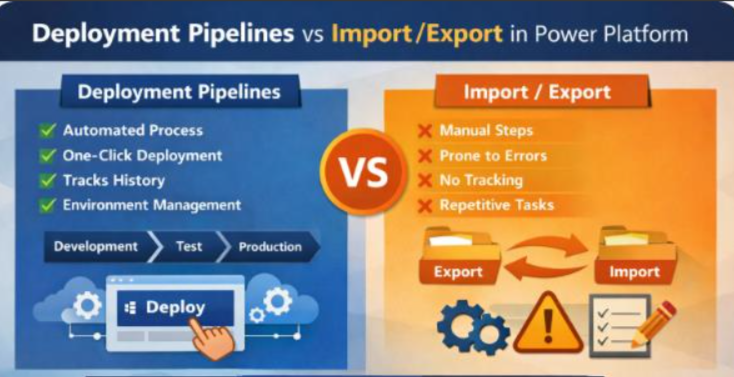
Deployment Pipelines vs Import/Export Comparison
|
Feature |
Deployment Pipeline |
Import/Export |
|
Automation |
Yes |
No |
|
Ease of Use |
Easy |
Manual |
|
Deployment Tracking |
Yes |
No |
|
Error Reduction |
High |
Low |
|
Enterprise Ready |
Yes |
No |
|
Recommended by Microsoft |
Yes |
No |
|
Connection Reference Handling |
Automatic |
Manual |
Recommended Best Practices
Use Deployment Pipelines for all enterprise apps
Use Managed solutions in Production
Use environment variables
Use connection references
Never develop directly in Production
Maintain separate environments
When to Use Import/Export
Import/Export is acceptable when:
- Small projects
- One-time deployments
- No pipeline configured
- Proof of concept
When to Use Deployment Pipelines
Deployment Pipelines should be used when:
- Enterprise applications
- Multiple environments exist
- Frequent deployments
- Team collaboration
- Governance and compliance required
Example Deployment Flow
Developer builds app in Dev
Deploy using Pipeline → Test
Tester validates solution
Deploy using Pipeline → Production
Users access production version
Conclusion
Deployment Pipelines provide a modern, automated, and enterprise-ready solution for managing Power Platform deployments. While manual Import/Export works for small projects, Deployment Pipelines improve reliability, reduce errors, and ensure proper Application Lifecycle Management.
Organizations adopting Power Platform at scale should implement Deployment Pipelines to ensure consistent and secure deployments.